⌂ Home Services Results Case Studies Certification About Contact
Back to Case Studies
Self-Hosted Local AI

AI SDR
Fully Automated
Cold Outreach

An autonomous outbound system powered by local AI that scores leads, generates personalized emails, and manages follow-up cadences — no SaaS subscription required.

3
Automated Flows
Ollama
Local LLM
0-100
AI Lead Scoring
Private
Self-Hosted

Who Is This For?

Founders who need outbound but lack the budget for a full SDR team.

Sales Teams looking to automate repetitive prospecting tasks.

Solopreneurs scaling outreach without scaling hours.

Agencies running cold email campaigns for multiple clients.

What You'll Need

Self-hosted n8n (uses native Ollama nodes).

Ollama running locally with a model installed (e.g., Mistral).

Google Sheets & Gmail OAuth2 credentials.

Telegram Bot credentials for real-time alerts.

Workflow Breakdown

Three synchronized flows running on weekday schedules.
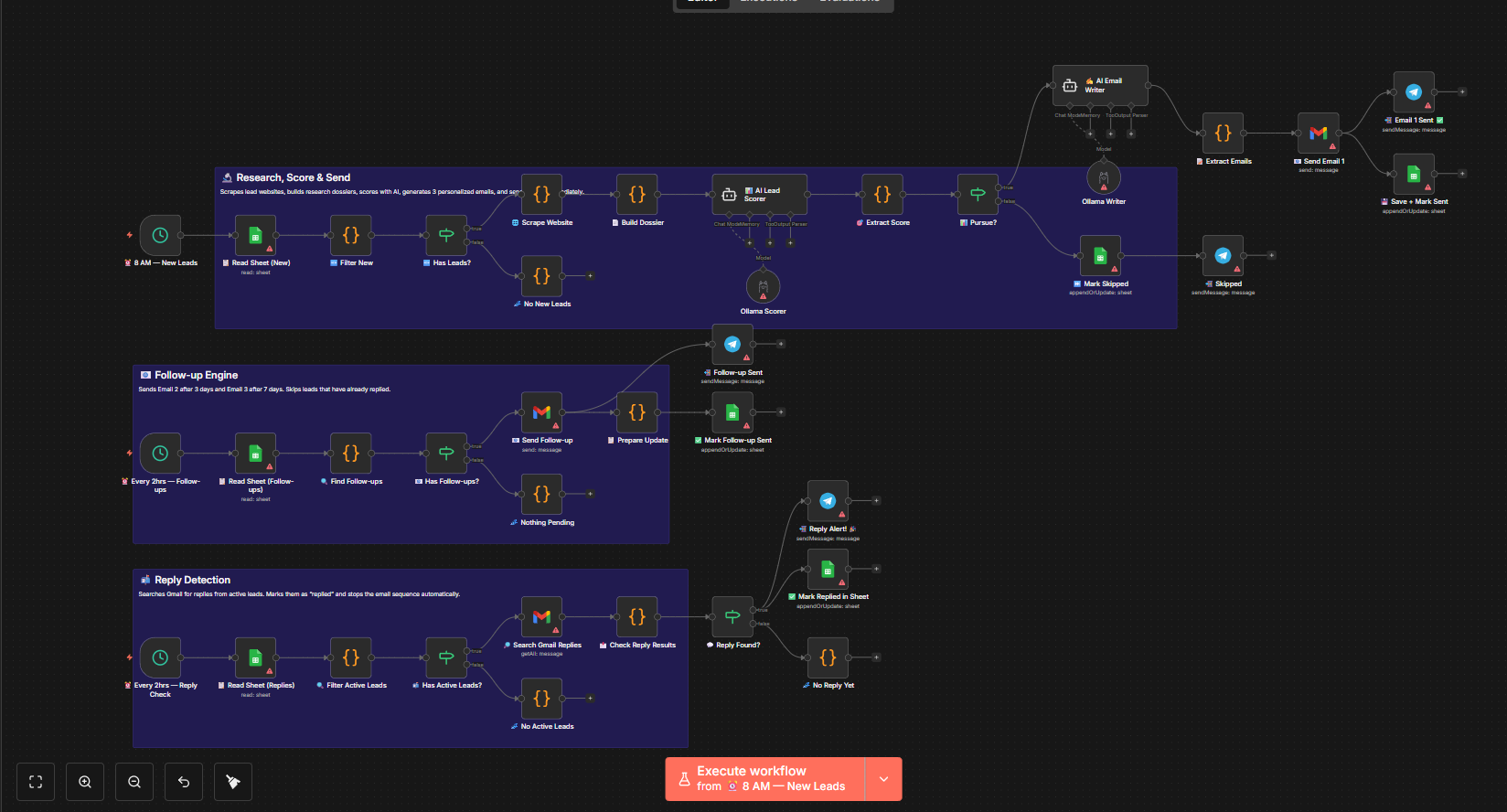
Workflow diagram for AI SDR
1

New Lead Processing

Runs at 8 AM on weekdays. Reads new leads from Google Sheets, scrapes their website to build a research dossier, and AI scores each lead (0–100) based on company fit, role match, and timing signals.

Sheets Trigger Web Scraper AI Scoring
Read Google Sheets
Filter by Status = 'New'
Scrape Website
Build Research Dossier
Ollama LLM
Score 0-100 & Generate 3 Emails
2

Follow-up Engine

Runs every 2 hours on weekdays. Checks for leads needing follow-ups. Sends Email 2 after 3 days and Email 3 after 7 days. Automatically marks sequence complete and skips replied leads.

Timed Triggers Cadence Logic Gmail Send
D1
Initial Send
D3
Follow-up #1
D7
Follow-up #2
3

Reply Detection

Runs every 2 hours on weekdays. Searches Gmail for replies from active leads, filters out your own sent emails to avoid false positives, marks the lead as "replied", stops the sequence, and sends a Telegram alert with the reply preview.

Gmail Search Logic Filter Telegram Alert
Reply Detected!
→ Telegram Alert + Update Sheet

Tools Powering This

n8n
Orchestration
Ollama
Local LLM
Gmail
Transport
Google Sheets
Database
Telegram
Alerts

Setup Steps

1

Google Sheets Config

Create a spreadsheet with columns: Lead Name, Email, Company, Website, Role, Status, Reply tracking columns.

2

OAuth2 Connections

Connect your Gmail for sending/searching and Google Sheets for reading/writing lead data.

3

Ollama Installation

Install locally and pull a model (e.g., ollama pull mistral). Swap for OpenAI/Anthropic if preferred.

4

Telegram Bot

Create a bot via @BotFather, grab your token and chat ID for real-time reply notifications.

5

Prompt Customization

Edit the AI Lead Scorer and Email Writer system prompts with your ICP, product details, and specific results.

6

Test & Activate

Add a test lead with status "new", run the research flow manually, verify emails generate correctly, then enable all schedules.

Get This
Workflow Template

Self-hosted, private, and infinitely customizable. Let me help you deploy this for your outreach.