Automatically watches your inbox, classifies content with local AI via Ollama, and applies labels — all with zero API costs.
Professionals drowning in email who need automated triage.
Founders who want to prioritize urgent messages automatically.
Freelancers managing multiple client threads simultaneously.
Privacy Advocates wanting local AI without data leaving their machine.
Gmail Account with OAuth credentials (read, modify, compose).
Ollama running locally with a pulled model (Mistral, Llama3, etc.).
n8n Instance (Self-hosted recommended for Ollama connectivity).
Google Sheets (Optional) for logging and analytics.
From inbox trigger to labeled thread and reply draft.
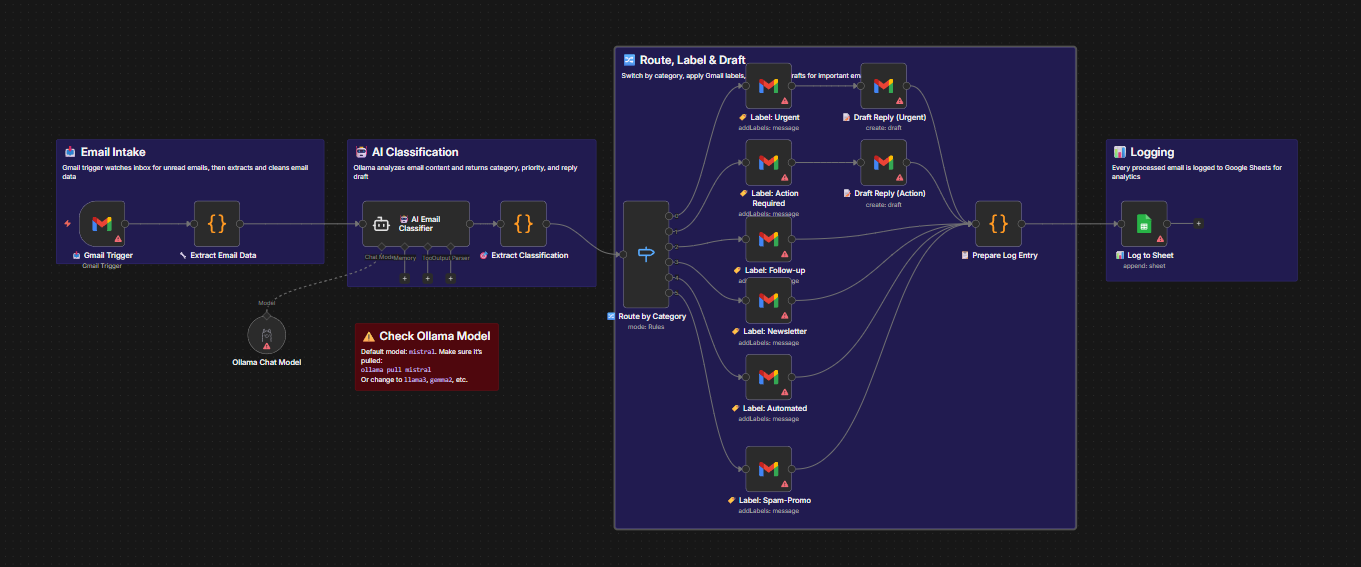
Watches inbox every 30 mins. Trigger detects new unread emails. The Extract node parses sender, subject, body, and metadata into clean fields for processing.
Ollama processes content locally. The AI analyzes the email and returns a structured classification: Category (Urgent, Newsletter, etc.), Priority, Confidence Score, Summary, and a Smart Reply Draft.
A Switch node routes emails to one of 6 paths. Gmail Label nodes apply the correct tag. Reply Draft nodes generate responses for urgent items. All data is logged to Google Sheets.
Connect your Google account. Grant read, modify, and compose permissions to allow labeling and drafting.
In Gmail, create 6 labels: 🔴 Urgent, 📋 Action Required, 💬 Follow-up, 📰 Newsletter, 🤖 Automated, 🚫 Spam-Promo.
Use the Gmail API or n8n's "Get Many Labels" operation to find the unique ID for each label. Update the workflow nodes.
Ensure Ollama is running locally (localhost:11434) and pull your model (e.g., ollama pull mistral).
Connect Google Sheets for logging. Create columns: Date, From, Subject, Category, Priority, Summary, Has Reply Draft, etc.
Send yourself test emails (urgent request, newsletter, promo). Run the workflow manually to verify classification and labeling.
Automate your inbox triage with local AI. No API keys, no monthly fees.