⌂ Home Services Results Case Studies Certification About Contact
Back to Case Studies
Content AI Automation

LinkedIn
AI Picks Best Post
+ Quality Gate

Automated daily research from trending sources, AI-curated post selection, and a multi-criteria quality gate — ensuring only your best content goes live.

2
Automated Flows
3
Drafts/Day
5
Quality Criteria
Auto
Publishing

Who Is This For?

Solopreneurs & Founders maintaining presence without hiring a content team.

Creators in tech, SaaS, or AI spaces needing trend-aware content.

Marketers who want data-driven posts on autopilot.

Busy Professionals who struggle to post consistently.

What You'll Need

Self-hosted n8n (uses native Ollama nodes).

Ollama running locally with a model (e.g., Mistral).

LinkedIn OAuth with w_member_social scope.

Google Sheets & Telegram Bot credentials.

Workflow Breakdown

Research, selection, and quality control — fully automated.
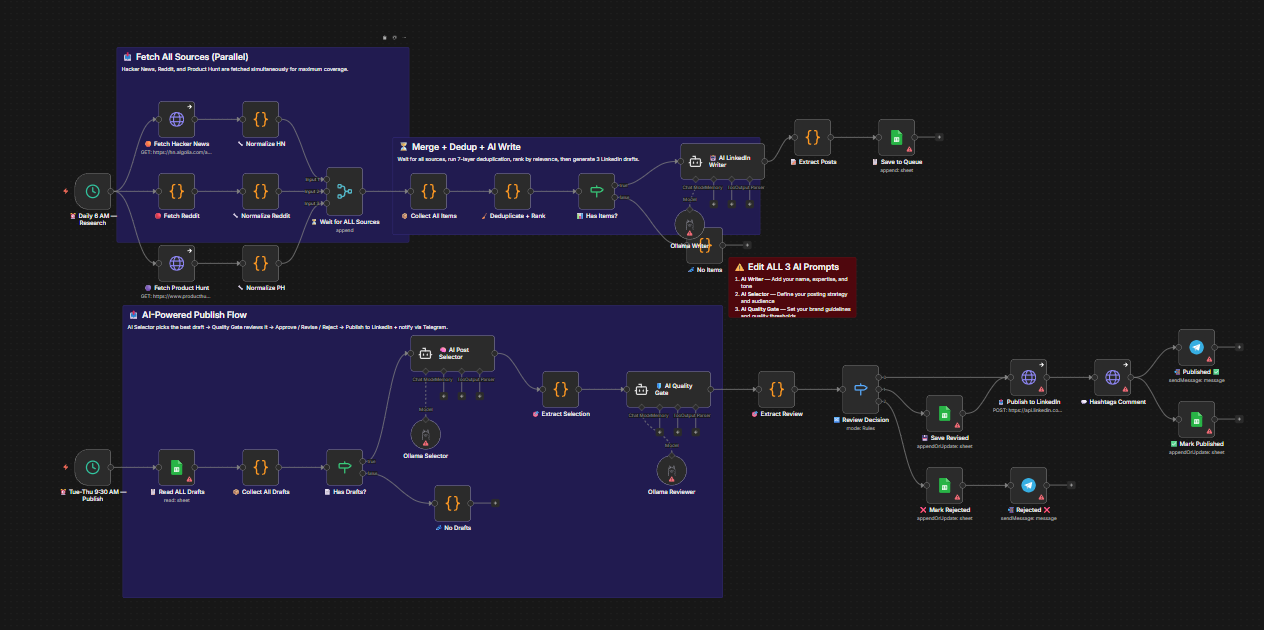
Workflow diagram for LinkedIn Auto-Poster
1

Daily Research (6 AM)

Fetches trends in parallel. Pulls data from Hacker News, Reddit (8 subreddits), and Product Hunt. Merges sources, runs 7-layer deduplication, and ranks by relevance. AI then generates 3 distinct LinkedIn drafts (Build Story, Insight, How-To).

HN / Reddit / PH Deduplication 3 Angles
Fetch Trends
HN + 8 Subreddits + PH
AI Writer
Generate 3 Drafts
2

Smart Publish (Tue/Wed/Thu)

Runs at 9:30 AM. AI Selector analyzes all drafts to pick the winner based on day alignment, angle variety, and hook strength. The winner passes through an AI Quality Gate (scored 1-10 on 5 criteria). Approved posts publish instantly; others are revised or skipped.

AI Selector Quality Gate Auto-Revise
Hook
Value
Authenticity
Post Approved
Score > Threshold → Publish to LinkedIn
3

Notification Loop

Telegram alerts for every action: post selected, post revised, post published, or post rejected. Stay in the loop without opening the sheet.

Telegram Alerts Status Tracking

Tools Powering This

n8n
Orchestration
Ollama
AI Brain
LinkedIn
Publishing
Google Sheets
Database
Telegram
Alerts

Setup Steps

1

Google Sheets Config

Create a sheet with columns: Post ID, Angle, Hook Line, Full Post, Hashtags, Trend Referenced, Word Count, Best Day, Status, LinkedIn URL, AI Review, Revised Post, etc.

2

Ollama & Models

Install Ollama locally and pull your preferred models (e.g., ollama pull mistral). Ensure sufficient resources for inference.

3

LinkedIn OAuth

Register an app at developer.linkedin.com with w_member_social scope. Get your Person URN and credentials.

4

Telegram & Prompts

Create a bot via @BotFather. Configure system prompts for the AI Writer, AI Selector, and Quality Gate nodes to match your brand voice.

5

Testing

Run the research flow manually first. Verify drafts appear in your sheet. Then test the publish flow manually before enabling the schedule.

6

Customization

Tweak AI Selector weights, adjust Quality Gate thresholds, or add more sources by duplicating the fetch/normalize pattern.

Get This
Workflow Template

Automate your LinkedIn presence with trend-aware, quality-gated content. Let me help you deploy this.