Automatically track page changes, calculate line-by-line diffs, and receive Telegram & Email alerts — perfect for competitive intelligence.
Marketers tracking competitor pricing, landing pages, and messaging.
Product Managers monitoring competitor feature releases and updates.
Intel Teams tracking policy changes, legal updates, or strategic moves.
Founders watching job boards for competitor hiring signals.
Google Sheets account with OAuth credentials.
Telegram Bot token and Chat ID via @BotFather.
SMTP or Gmail credentials (optional, for email alerts).
n8n Instance (Cloud or Self-hosted).
From URL fetch to instant alert.
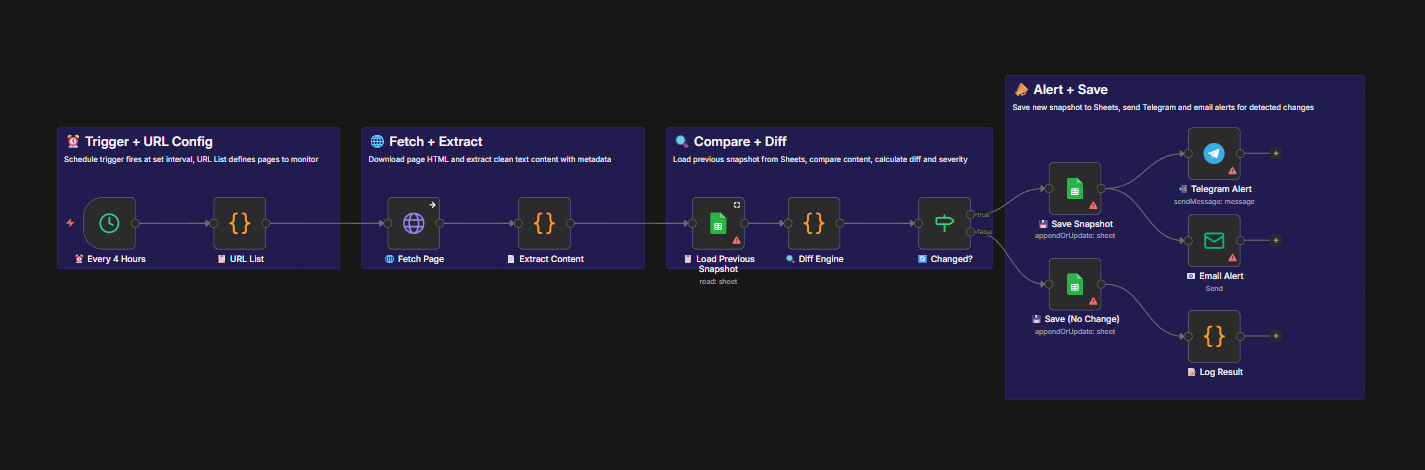
Runs every 4 hours. The Schedule Trigger initiates the check. A URL List node feeds into an HTTP Request that fetches the current HTML content with browser-like headers.
Content Extractor strips HTML tags and scripts to get clean text. The Diff Engine compares this against the previous snapshot stored in Sheets, calculating change percentage and severity level.
A Change Filter ensures only actual changes pass through. The new version is saved to Sheets, and formatted alerts with the diff summary are sent instantly to Telegram and Email.
Edit the "URL List" code node. Add your target URLs with a friendly name and optional CSS selector keyword.
Create a sheet named "website" with columns: Name, url, pageTitle, cleanText, contentHash, fetchedAt, etc. Connect OAuth.
Create a bot via @BotFather, get your Token and Chat ID. Connect the Telegram credential in the alert node.
Connect your SMTP or Gmail credential in the Email Alert node and set your destination addresses.
Set the cron interval in the trigger node. Use 1 hour for critical pages or 24 hours for low-priority monitoring.
Run manually once to save baseline snapshots. Change detection starts from the second run onward.
Monitor competitor pages, pricing, and policies on autopilot.