Back to Case Studies
WhatsApp AI Lead Gen

WhatsApp AI
Auto-Respond
+ Classify

Instantly classify inbound leads, send tailored auto-replies, and book meetings automatically — all via WhatsApp.

4
Intents
Auto
Reply
G-Cal
Booking
24/7
Active

Who Is This For?

Sales Teams receiving inbound leads via WhatsApp who need instant qualification.

Agencies managing client communication across multiple channels.

Small Businesses wanting to automate first responses without missing messages.

Service Providers booking appointments directly from chat interactions.

What You'll Need

WhatsApp Business API access (Meta Cloud API).

Google Sheets & Calendar accounts with OAuth credentials.

LLM Endpoint (Ollama, OpenAI, or Anthropic).

n8n Instance (Cloud or Self-hosted).

Workflow Breakdown

From WhatsApp message to qualified meeting.
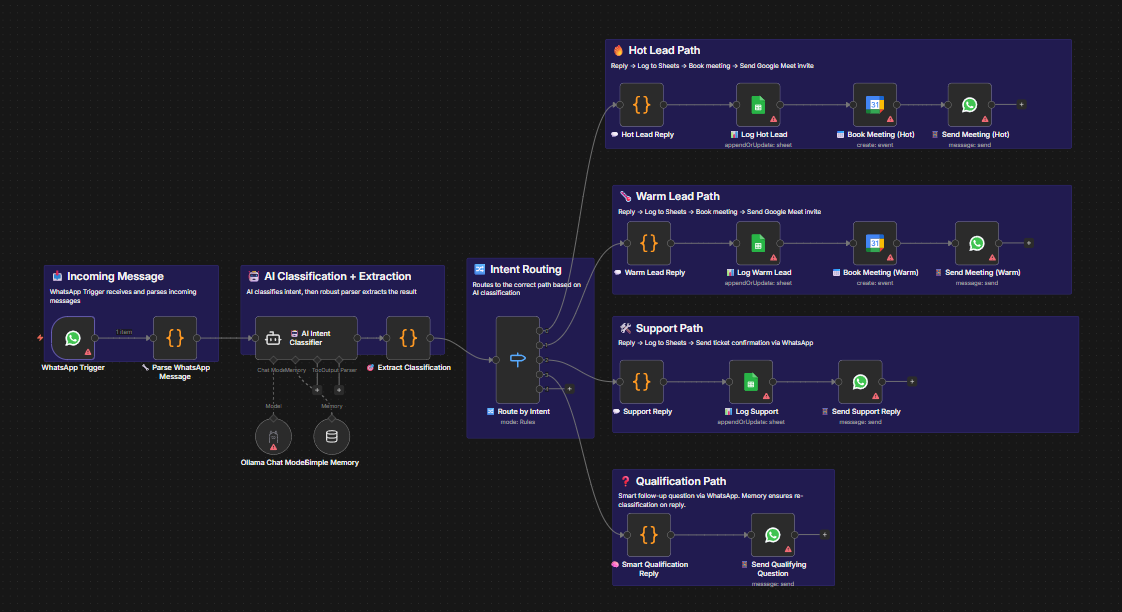
Workflow diagram for WhatsApp Lead AI
1

Trigger & Parse

Listens for incoming messages. The WhatsApp Trigger receives messages and immediately filters out bot/status messages to prevent infinite loops, ensuring only real user messages proceed.

WhatsApp Trigger Filter
WhatsApp Trigger
Receive & Filter
AI Agent
Classify Intent
2

Smart Routing

Classifies into 4 intents. Hot Lead, Warm Lead, Support, or Needs Qualification. Conversation memory ensures context is preserved if the user provides more info in follow-up messages.

Hot Lead Support Qualification
🔥 Hot
Book Instantly
☀️ Warm
4hr Slot
Smart Router
Route by Intent + Confidence
3

Action & Logging

Hot/Warm leads trigger a reply, log to Google Sheets, and auto-book a Google Calendar meeting with a Meet link sent back via WhatsApp. Support requests get ticket confirmations.

G-Cal G-Sheets Auto-Reply
Meeting Booked
Calendar + Sheets + Reply

Tools Powering This

n8n
Orchestration
WhatsApp
Channel
G-Cal
Booking
LLM
AI Brain

Setup Steps

1

WhatsApp API

Connect your WhatsApp Business API credentials via Meta Cloud API in n8n.

2

Google OAuth

Connect Google Sheets and Google Calendar credentials. Set your spreadsheet ID in the logging nodes.

3

Configure LLM

Set your Ollama endpoint or connect OpenAI/Anthropic API keys in the AI Agent node.

4

Bot Numbers

Update BOT_NUMBERS and phoneNumberId in the relevant nodes.

5

Test Message

Send a test WhatsApp message to your business number. Verify the full flow from classification to reply.

6

Customize

Edit reply templates, adjust meeting booking times, or add Slack notifications for new leads.

Get This
Workflow Template

Automate your WhatsApp lead qualification and booking process today.